In the area of process management and business informatics, the Business Process Model and Notation (BPMN) plays a central role. It is an indispensable tool for companies to structure and optimize complex processes. This article takes you through the diversity and efficiency of BPMN, particularly when used within the Aeneis BPM software.
What is BPMN?
BPMN stands for Business Process Model & Notation and is a graphical specification language. But BPMN is not just a collection of graphical symbols. Instead, BPMN was developed as a comprehensive language to effectively model, document and optimize business processes and workflows. This universal language enables professionals from various disciplines — from methodology to computer science — to understand and design business processes, which enables business goals to be achieved more efficiently.
BPMN's strength lies primarily in its visual presentation power. By using diagrams, known as Business Process Diagrams (BPDs), BPMN enables a clear and understandable illustration of business processes. These charts promote communication and understanding between different stakeholders.
BPMN 2.0 — History and current status
BPMN was created at the beginning of the 21st century, initiated by Stephen A. White from IBM. It was published as a standard by the Business Process Management Initiative (BPMI) in 2004. The Object Management Group (OMG) later assumed responsibility for the development of BPMN, which included it in the series of other important standards, such as the Unified Modeling Language (UML). With the introduction of BPMN 2.0 by OMG in 2011, the standard was expanded to include important aspects such as a uniform format for exchanging diagrams, which further simplified its use and distribution.
A standardized XML format, which improves compatibility between different modeling platforms, has further revolutionized business process modeling. BPMN 2.0 allows adjustments, improves the integration of human interactions and introduces choreography models. In addition, BPMN 2.0 was standardized as ISO 19510 in 2013, which further underscores its international significance as a universal modeling standard. Recognized as an ISO/IEC standard, BPMN 2.0 bridges the gap between business processes and IT. However, there are still some challenges today, particularly when it comes to user interactions.
When and why does BPMN make sense?
BPMN is a standardized language for business process modeling and thus enables a uniform and understandable presentation of complex business processes. The aim is to improve communication between various stakeholders, such as managers, IT specialists and process participants.
The precise visualization of process flows using BPMN helps companies identify inefficiencies and potential for improvement. This results in optimized process design and implementation, which in turn can contribute to cost savings and increased productivity. In addition, BPMN promotes the standardization of processes, which supports the scalability and adaptability of companies in a constantly changing business environment.
BPMN in Aeneis
Our BPMN software Aeneis provides you with special functions so that you can document your success-relevant processes. In the following, we take a closer look at the basic components of BPMN diagrams and illustrate their application and significance.
What is a BPMN diagram?
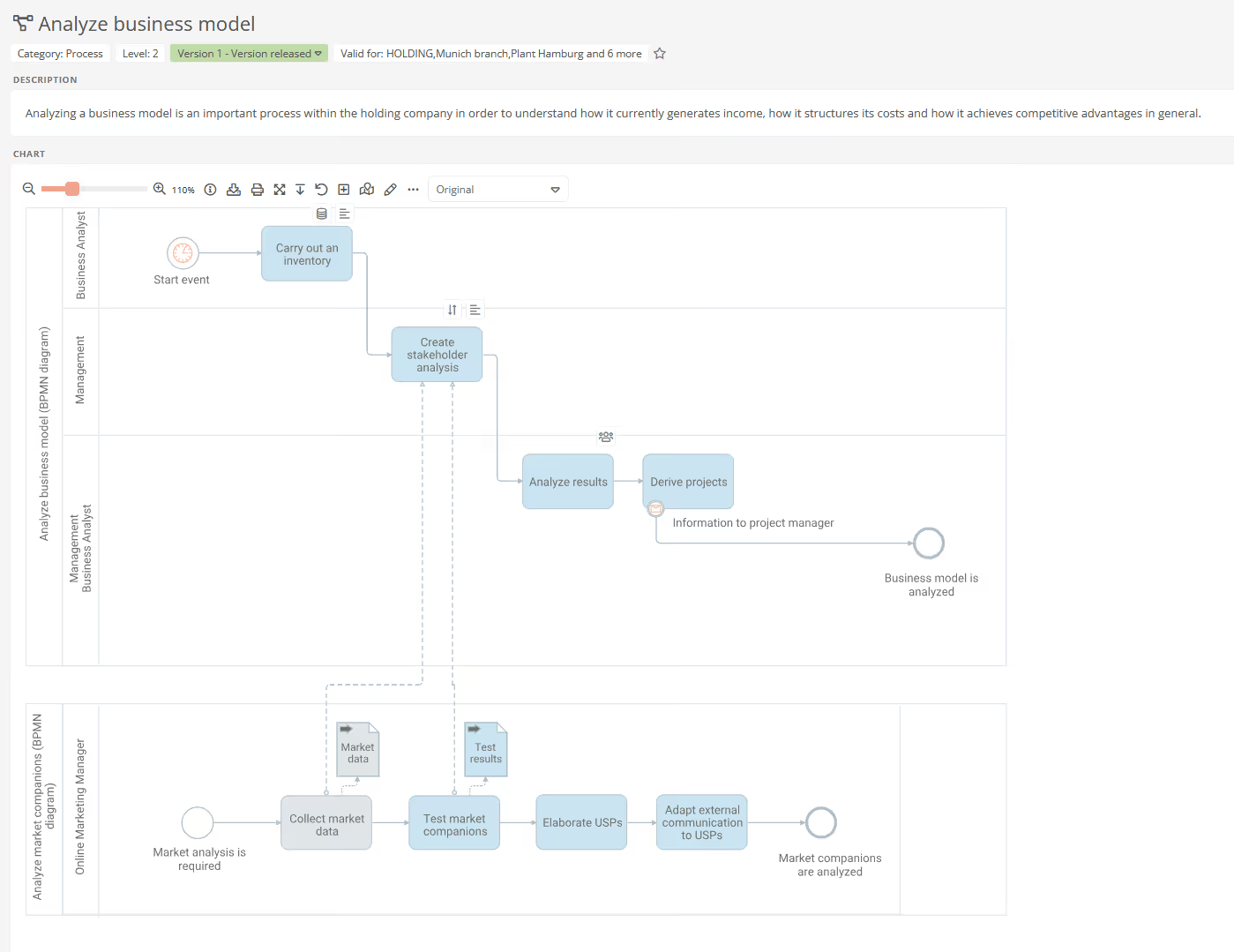
A BPMN diagram is a graphical tool for representing business processes. It uses standardized symbols to visualize processes, decisions and interactions within a process. These diagrams make it easier to understand complex process structures and promote clear communication between different stakeholders. They are crucial for planning, analyzing and optimizing business processes by providing a precise and easy-to-understand process map.
Activities
Activities in BPMN are basic building blocks for representing process steps in a business process model. They represent the specific actions or work steps that are carried out in a business process. Through their precise definition and presentation, activities provide a clear view of the individual components that make up a process.
- Subprocesses: In BPMN, subprocesses (represented by subprocess shapes) serve to illustrate more complex segments within a higher-level process. They provide a detailed view of specific processes that consist of several steps or tasks. These subprocesses are particularly useful when it comes to capturing deeper levels of process logic without affecting the clarity of the main diagram. Subprocess shapes provide direct access to specific, detailed diagrams that show the internal processes and steps of the subprocess.
- Tasks: Tasks in BPMN, represented by task shapes, are essential elements for visualizing specific work steps in a process. Each task represents a single, clearly defined activity or action that is necessary to achieve a specific goal in the overall process. Tasks can come in various forms, depending on the type of activity and its role in the process. In BPMN diagrams, these shapes provide a clear and structured presentation of the individual steps, both in larger processes and in subprocesses.

Events
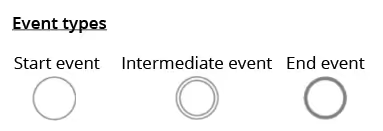
In BPMN 2.0, events are used to visualize various phases of a business process. They are economically relevant conditions that are either triggered by external factors or generated by the process itself. These events are represented by specific symbols in BPMN diagrams to clearly visualize the various states and their effects on the process flow. Basically, the following three types can be differentiated:
- Start events: They are the trigger for the start of a process. A start event initiates sequence flow, i.e. initiates the start of process activities.
- Intermediate events: These events occur during the process and can temporarily interrupt the sequence flow. They react to specific conditions or events that occur during the process flow.
- End events: They mark the end of the process flow. As soon as an end event is reached, the sequence flow and thus the process is terminated.
Gateways
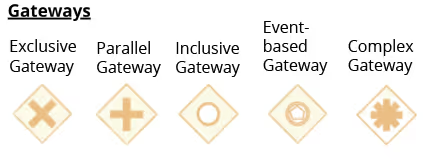
In BPMN, gateways represent the branches and merges in a process flow, which control the direction of the process depending of specific conditions or events. They are crucial for modeling nonlinear processes. In the following, we describe the main gateways:
- Exclusive gateway: This gateway routes the flow along exactly one path based on a specific condition (“either/or”). When merging, only one path continues.
- Parallel gateway: Here, all outgoing paths are traced simultaneously (“and”). The process flow only continues when all incoming paths have been fulfilled.
- Inclusive gateway: Allows you to track one or more paths (“and/or”), waiting for all triggered paths when merging.
- Event-based gateway: Here, the sequence flow continues along the path whose associated event is the first to occur.
- Complex gateway: Used to represent complex decision scenarios that go beyond the possibilities of simple gateways. It determines which outbound paths are traced based on process data or the status of incoming sequences. It is also possible for several paths to be active at the same time.
Connectors
In BPMN diagrams, sequence and message flows connect the various elements of a process and play a decisive role in representing process dynamics. These flows are therefore essential for understanding how the various components of a business process interact.
- Sequence flow: Sequence flows are the cores of a BPMN process that connect activities, events, and gateways. They illustrate the chronological and logical sequence of the process by showing the path that the process takes.
- Message flow: Message flows, on the other hand, are the channels for communication with external process participants. They start with one activity and end with another activity, pool, or message event, representing the exchange of information outside the internal process flow.
Pools and swimlanes
In BPMN diagrams, pools and lanes are used to clearly represent the structure and participants of a process. Together, they form the framework of a BPMN diagram and contribute significantly to the clarity and structuring of process participants and their respective tasks.
- Pool: A pool in BPMN represents the main responsible process participants or a higher-level unit that coordinates the overall flow of the process. The pool comprises the entire process and is therefore a type of framework that visualizes a complete process or a process participant.
- Swimlane: Swimlanes on the other hand are sub-segments within a pool and represent specific organizational units, roles, groups or individual employees. They are positioned within a pool and show which tasks are being handled by which process participants or which department. Swimlanes thus help to divide the process into logical sections and clearly define responsibilities.

Rule validation in BPMN diagrams
When modeling BPMN diagrams in tools such as Aeneis, the rule validation is a helpful feature. When activated, it checks that the diagram complies with the specified BPMN 2.0 rules. Errors or discrepancies are shown directly in the diagram, which allows immediate correction.
This function therefore ensures the accuracy and standard compliance of the diagrams, which is essential for the efficiency and correctness of business process modeling. It makes a significant contribution to avoiding errors and optimizing the modeling process.
Modeling BPMN diagrams in the WebModeller
The Aeneis WebModeller is a powerful tool for graphical process modeling. It is accessible via a web-based interface. Employees can easily create, arrange and link BPMN shapes, although basic BPMN knowledge is sufficient.
Its ease of use makes the WebModeller particularly popular with BPM teams for quickly modeling and adapting processes. The WebModeller also offers a shortcut bar for frequently used icons and a model overview, which provides in-depth insights and comprehensive management of process and organizational structures. It is therefore also ideal for management.
WebModeller structure
The WebModeller in Aeneis has a clear and intuitive layout based on the structure of the portal. On the left side is the model overview, which provides quick access to the individual objects of the process and organizational structures. At the center of the interface is the drawing area, which represents the main area for process modeling. Here, team members can visually design and develop their processes. On the right side, there is the sidebar with the properties, which offers detailed settings for the selected object. Both this sidebar and the model overview can be collapsed to create more room for modeling.
The WebModeller provides shortcuts to the most frequently used modeling shapes for efficient design. In addition, the WebModeller provides access to the full range of BPMN 2.0 notation, with many teams preferring a limited selection of shapes. This promotes consistency and makes it easier for employees to apply a standardized modeling approach.

Start modeling
The modeling process in the Aeneis WebModeller starts with the intuitive drag-and-drop feature. Employees start by dragging shapes from the shapes palette onto the drawing area. There you can continue working directly on the shape. You can either drag and drop shapes from the palette or use the context-sensitive menu on the shape to model. This allows you to add subprocesses and gateways in just a few moments, such as the exclusive gateway for decision-making processes.
Add tasks
The next step is to add the individual tasks and connect them logically. The process is flexible: Existing processes can easily be reused and new tasks can be integrated. The Auto-Layouter tool ensures a continuous and clear arrangement of the process steps.
Responsibilities are assigned via swimlanes, which represent roles such as “trainee” or “accountant” and assign the process flow to the respective person responsible. In the diagram, swimlanes can be added using the palette. The individual shapes can then be dragged and dropped into the swimlane to assign responsibility and visually represent them in the diagram.

Add documents and IT systems
In addition, you can also attach IT systems and documents to processes in the WebModeller, which enables deep integration into corporate structures. You can also easy fine-tune processes, by adding additional steps or documents.
Completion of modeling
Finally, you can make color settings and other visual adjustments to adapt the diagram to the corporate CI. Overall, the WebModeller from Aeneis thus offers an intuitive, fast and flexible way to model and adapt BPMN processes.
For more information on efficient process modeling, please read our article on 10 tips for modeling in Aeneis.
Test Aeneis free in your company for 30 days
With its WebModeller, Aeneis provides a powerful tool for companies. From basic modeling to advanced functions such as the integration of IT systems and documents, Aeneis enables a comprehensive and efficient design of business processes.
With our non-binding 30-day trial you can test Aeneis completely free of charge in your company and get to know its advantages.

FAQ
What is BPMN — briefly explained?
BPMN (Business Process Model & Notation) is the standard language for graphically modeling business processes. Aeneis uses BPMN as a basis for presenting processes consistently, managing them centrally and making them understandable and evaluable for specialist areas and IT.
Why BPMN 2.0 — and what does the standard do?
BPMN 2.0 offers a uniform XML exchange format and is recognized as ISO 19510. Aeneis fully supports BPMN 2.0, including import/export, version-safe storage and tool compatibility, so that models can be shared and further processed without interruption.
Which BPMN basic elements should I know?
In Aeneis, you model activities (tasks, subprocesses), events (start/intermediate/end), gateways (e.g. exclusive/parallel/inclusive), sequence/message flows, and pools & lanes for responsibilities. Aeneis also links these elements with roles, documents and IT systems, among other things.
How does Aeneis support BPMN modeling in practice?
The Aeneis WebModeller, the modeling environment, offers drag-and-drop, shortcut bar, Auto-Layouter, CI colors, model overview and BPMN rule validation. Assign responsibilities via swim lanes, and attach documents and IT systems directly to process objects, all intuitively in the browser.
What is the rule validation in Aeneis good for?
The integrated BPMN 2.0 rule validation in Aeneis marks errors directly in the diagram and ensures standard compliance. This improves quality, comprehensibility and auditability and is the basis for automation.
When is BPMN particularly worthwhile in companies?
For complex, cross-divisional or regulated processes. In Aeneis, BPMN models are linked to risks, measures, documents and IT assets. Dashboards & reports make bottlenecks visible and support continuous improvement (CIP).
What added value does BPMN in Aeneis offer compared to pure diagram drawing?
In Aeneis, BPMN diagrams are part of the organization's digital twin: Processes are linked to roles, systems, policies and tasks/workflows, including versioning, releases and role rights. This makes models operationally controllable and verifiable in an audit-proof manner.